Skip to content

Pinterest Video Downloader

Download Pinterest videos free. HD up to 1080p when Pinterest serves that file, no watermark, no login. Works on iPhone, Android, and PC.

Paste one public Pinterest link. pin.it short links work.

Only save Pins you are allowed to keep. PintrestVideoDL is not affiliated with Pinterest.

  • MP4 format
  • HD when Pinterest has it
  • No watermark
  • 100% free
  • No sign-up

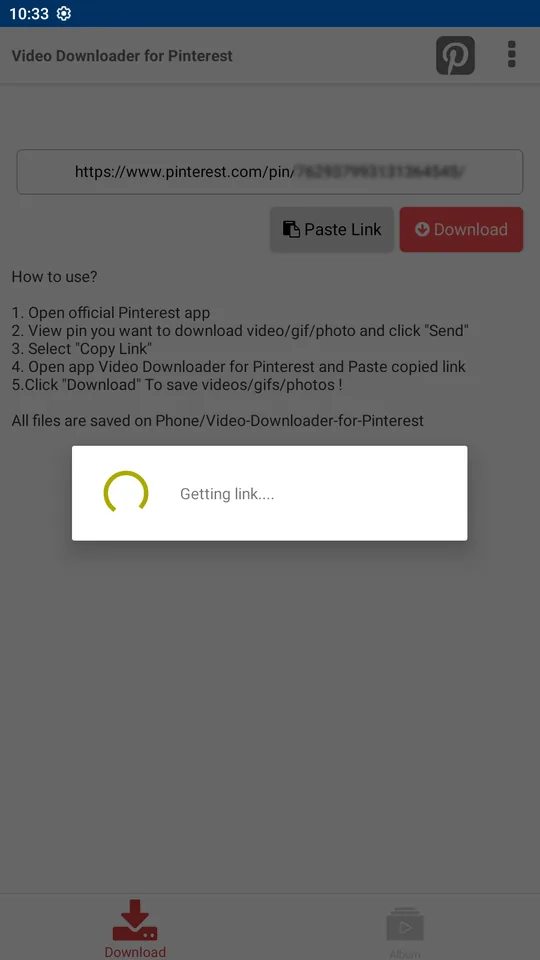
Copy the Pin URL, paste it above, press Download.

1080p
When Pinterest serves it
Browser
No app to install
100%
Free, no account

Steps to download from the phone

  1. 1

    Open the Pinterest app and choose the video, image, or GIF.

  2. 2

    Tap Share, then Copy link. The pin.it address is enough.

  3. 3

    Open this page in Safari or Chrome, paste the link, and press Download.

  4. 4

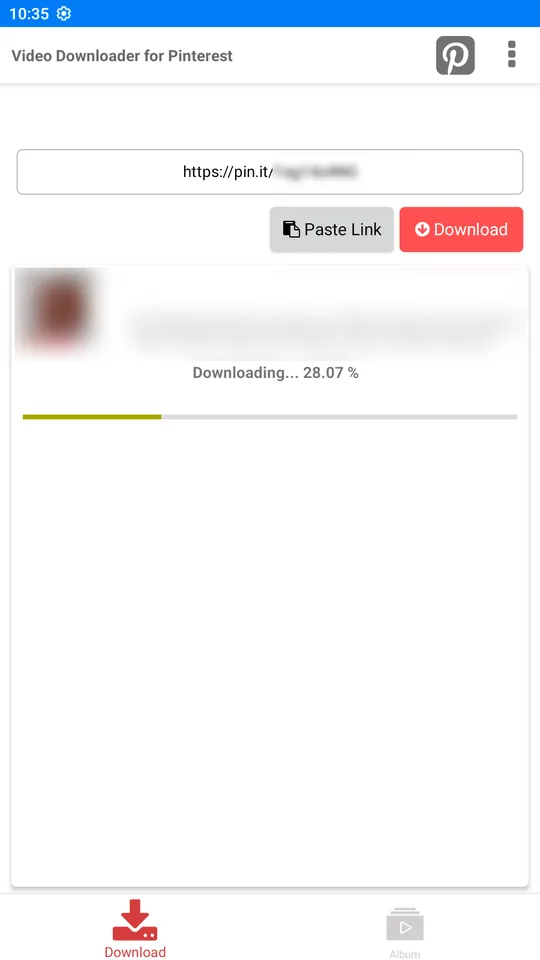
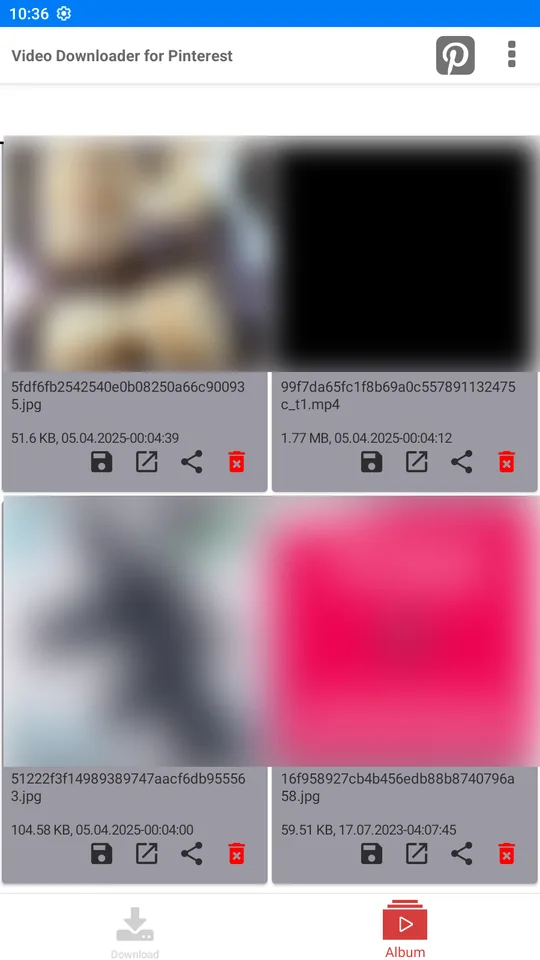
    Press Save. On iPhone keep it in Files or Photos. On Android it goes to Downloads.

  1. 01

    Copy the Pin link

    In the Pinterest app, open the Pin, tap Share, then Copy link. On the website, copy the address bar. A pin.it link is enough.

  2. 02

    Paste it here

    Drop the link in the box and press Download. Country domains such as pinterest.co.uk and pinterest.fr are accepted.

  3. 03

    Save the file

    Preview the result, then press Save. Your browser stores the MP4, image, or GIF. We do not ask for a Pinterest password.

Steps to download from the desktop

The same box works in Chrome, Edge, Firefox, and Safari. No app and no extension.

  1. 1

    Open the Pin on the Pinterest website and choose the video, image, or GIF.

  2. 2

    Copy the address from the browser bar, or paste a pin.it link you already copied.

  3. 3

    Paste the URL in the box at the top of this page and press Download.

  4. 4

    Preview the file. Press Save when it is the one you want.

  5. 5

    The file lands in your Downloads folder. Drag it anywhere you want to keep it.

What works and what does not

Public Pinterest links and the media this site can and cannot read.

Works

Does not work

  • Public Pins and pin.it links
  • Public Ideas pages and Answers pages
  • Public boards and profiles, up to 50 Pins from the page
  • Videos, images, GIFs, stories, carousels, and Idea Pins
  • HD, 2K, and 4K when that is the file Pinterest actually serves
  • Private, login-only, restricted, deleted, or unavailable Pins
  • Invitation and board-collaboration links
  • Bypassing a login or a secret board
  • Inventing or upscaling a resolution Pinterest did not publish
  • A Pin that only points at another website, such as YouTube

HD, 2K, and 4K are saved when Pinterest provides those source files. The download is that file, not a stretched copy. Many videos are 720p. Results differ from Pin to Pin, and a small file is never relabeled as 4K.

It works in the browser you already have

There is nothing to install. iPhone, Android, and desktop all use the same paste box.

What else you can download

The same box handles more than a single video. Profiles and boards return up to 50 public Pins, and those Pins can be videos, GIFs, images, stories, or carousels.

Why Pinterest has no download button

Saving a Pin inside Pinterest only bookmarks it on a board. The video stays on Pinterest. The bookmark disappears if the creator deletes it, and nothing is stored on your phone. A file you download plays offline, in the kitchen, on a flight, or in an editor. This site reads the public file the way a browser does and hands it to you. It does not sign in, and it does not keep a copy.

If a download fails

  • The copied link is a board, a search page, or a home feed, not a Pin.
  • The Pin is a still, so there is no video to save. Use the image result instead.
  • The Pin is private, deleted, or only visible after login.
  • The Pin only points at YouTube or another website.
  • The browser blocked the save. Check the download prompt.
  • The transfer stopped early and left an empty file. Paste the link again.

Download not working

Is PintrestVideoDL safe to use?

Yes, if you treat it like any other public download page. PintrestVideoDL never asks for a Pinterest username or password, and it cannot see secret boards or anything behind a login. The link you paste is used only to find the file Pinterest already published. Your browser then saves that file. We do not keep a public library of videos, we do not add a watermark, and we do not grant you the right to repost someone else's work. Google Tag Manager and Google AdSense may measure visits and show ads. Keep your browser updated, and download only what you are allowed to keep.

  • No Pinterest username or password is asked for, ever.
  • It runs in your browser. This site does not get access to your Pinterest account.
  • Private, invitation, login-only, and deleted Pins are refused.

Google Safe Browsing · Norton Safe Web · Sucuri

Creator rights

A public Pin is not free to reuse. Download only what you own or are allowed to save. Keeping a copy for yourself is not the same as reposting it, selling it, or putting it in an ad. This site does not grant that permission. PintrestVideoDL is not affiliated with Pinterest.

Privacy

The link you paste is used to prepare the file. Google Tag Manager and Google AdSense may measure visits and show ads. Lookup counts are stored in aggregate. The file itself is not kept as a public library. Read the privacy policy for the details.

Privacy Policy

Watch the real steps

How to download a Pinterest video

A 2 minute 12 second walkthrough with sound. Open the Pin, copy the link, paste it, press Download, and open the saved file full size.

2:12Full walkthrough with sound

Watch the 2:12 tutorial

Nothing is hosted here

PintrestVideoDL does not keep a library of Pinterest videos, images, or GIFs. A file is prepared when you submit a public link, then your browser saves it. Read the terms before you use the site. These are the kinds of addresses that work:

  • https://pin.it/…
  • https://www.pinterest.com/pin/…
  • https://www.pinterest.co.uk/pin/…
  • https://in.pinterest.com/pin/…
  • https://www.pinterest.com/username/board/
  • https://www.pinterest.com/username/

What's new

  1. A real download tutorial

    • The homepage video follows a public pin.it link from paste to playback.
    • You see Download pressed, then the returned video with its own sound.
    • Preview, Save, and Save cover are all on the result.
    • The clip is long enough to walk through the phone path and the desktop path.
  2. Phone steps, desktop steps, and a clear table

    • The phone path is four steps: open the Pin, copy the link, paste it, and save.
    • The desktop path is five steps and ends in your Downloads folder.
    • A two-column table lists what a public link can return and what is refused.
    • HD, 2K, and 4K are kept only when Pinterest actually serves that file.
  3. A full article on every tool

    • Image, GIF, story, carousel, and Idea Pin each explain that format.
    • Ideas pages, Answers pages, profiles, and boards explain the 50 Pin cap.
    • The MP4 page explains picture, sound, and why we do not invent a 4K file.
    • Help pages cover a failed download, quality, and where the file is saved.
  4. Covers, captions, and faster photos

    • A video result can save its cover image next to the MP4.
    • A caption can be copied when Pinterest sent one.
    • Page photos are WebP and load as you scroll.
    • The first screen does not wait on every card below it.
  5. Forty languages, one box

    • The public site is available in 40 languages. English has no prefix.
    • pin.it links and country Pinterest hosts use the same box.
    • Public boards and profiles return up to 50 Pins from the page.
    • Chinese and Russian are not included.

Changelog

Frequently asked questions

What is PintrestVideoDL?

A browser tool. You paste a public Pinterest link, the service reads the media Pinterest already published, and your browser saves the file.

How do I download a Pinterest video?

Copy the Pin link, paste it into the box, press Download, then press Save on the file you want.

Do pin.it short links work?

Yes. Links copied from the Pinterest app as pin.it are accepted, including links on country domains such as pinterest.co.uk.

Do I need a Pinterest account?

No. Never type a Pinterest password on this site.

What quality do I get?

The highest file Pinterest serves for that Pin. Many videos are 720p MP4 with sound. We do not invent a 4K file by stretching a smaller one.

Can I download a board or a profile?

Public boards and profiles can return up to 50 Pins found on the page. Private boards and secret Pins are refused.

Where does the file go after I press Save?

Into your browser's download location. iPhone uses Files or Photos, Android uses the Downloads folder, and a computer uses the folder Chrome, Edge, Firefox, or Safari is set to.

Does the video keep its sound?

Yes, when Pinterest published a soundtrack. The MP4 includes the audio that plays on the Pin. A silent Pin stays silent.

Can I paste more than one link?

Yes. Separate public Pin links with spaces, up to eight in one paste. A board or profile is one link and can return up to 50 Pins from that page.

Is PintrestVideoDL part of Pinterest?

No. It is an independent site at pinterestvideodl.com. It is not affiliated with, endorsed by, or sponsored by Pinterest. Do not enter a Pinterest password.

Why did a link fail?

The usual reasons are a private or secret Pin, a deleted Pin, an invitation link, or an address that is not Pinterest. Wait a minute and paste a public pin.it or pin page link again.

Do pinterest.co.uk and other country sites work?

Yes. Country hosts such as pinterest.co.uk, pinterest.fr, pinterest.de, and in.pinterest.com are accepted, along with pin.it short links.

Do you add a watermark?

No. The download is the file Pinterest published. We do not stamp a logo on it.

Does the creator get a notification?

No. This site never signs in to Pinterest, so your name is not attached to the lookup.

Where is Pinterest's own download button?

Pinterest lets you download many images from the Pin menu. Video Pins usually have no download. Paste the link here to save the MP4.

What if the Pin only links to YouTube or another site?

We save media Pinterest hosts. A Pin that only points at another website is refused.

Can I keep the soundtrack by itself?

The soundtrack stays inside the MP4 when Pinterest published one. We do not make a separate MP3.

Will the file vanish if the Pin is deleted?

A file you already saved stays on your device. A Pin that is deleted before you paste it cannot be downloaded.